Broadcom Trident 2, 40nm, 4 billion, 104x10GE
Broadcom Trident, 40nm, 64x10GE
Cisco 3548, 412mm2, ??nm, 2.5 billion, 48x10GE
Intel Alta FM6000, ??, 65nm, 1.2 billion, 72x10GE
Tuesday, March 26, 2013

Wednesday, January 30, 2013
what asics do the switches use?
| Switch | Announce Time | ASIC | Port | Fwd Latency | Onchip Buffer | Mac | IPv4 | ACL | Other Features |
|---|---|---|---|---|---|---|---|---|---|
| Cisco 3548 | 2012.09 | Cisco Monticello |
48x10G | 190ns | 18M | 64K | 16K LPM + 64K Host | 4K | ECN, NAT |
| Arista 7150 | 2012.09 | Intel Alta | 64x10G | 350ns | 9.5M | 64K | 84K LPM + 64K Host | 24K | NAT |
| Arista 7124FX | 2012.03 | Intel Bali + Stratix | 24x10G | sub 500ns | 2M | 16K | 16K LPM | 2K | |
| Arista 7050 | 2011.03 | BCM Trident+ | 64x10G | 800ns ~1200ns | 9M | 128K | 16K LPM + 32K Host | 3K | ECN |
| Arista 7124SX | 2011.03 | Intel Bali | 24x10G | sub 500ns | 2M | 16K | 16K LPM | 2K |
Thursday, January 24, 2013
Thursday, December 27, 2012
ubuntu remote desktop
when you want to do remote desktop from a window server to an ubuntu desktop, one way is to use vnc. You need to enable remote desktop access at ubuntu desktop and you want to install vnc client at your window client.
At ubuntu, you run /usr/bin/vino-preferences. It is a X server application. So, if you want to run remotely, you need first install X-server environment at your window client. You can install xinit in cygwin. Then run xinit at cygwin.
Second, you use 'DISPLAY=localhost:0.0 ssh -X ubuntu_ip', and run vino-preferences. Then you need restart the vino-server by following commands
you@machine-name:~$ export DISPLAY=:0.0
you@machine-name:~$ /usr/lib/vino/vino-server &
On your ubuntu desktop you should see following by typing 'netstat -antp | grep vino-server'
tcp 0 0 0.0.0.0:5900 0.0.0.0:* LISTEN 6936/vino-server
Once you verify that the vino-server started as you want, you can run vnc to connect to your ubuntu desktop.
Saturday, December 22, 2012
git cherry-pick
git cherry-pick allow you to reply a commit or several commits in local repository on a existing branch. The main argument for cherry-pick is a commit id. However, you need to make sure the commit id is in local.
In some cases, you can have several remotes. One of task is you get changes from one remote, and upload the changes to another remote. The procedure would be as follow
1. Fetch repros from remote A. (git fetch [remote])
2. Find out the commits you want to push to remote B. (git log --pretty=oneline)
3. Using cherry-pick to apply those commits to your local branch. (git cherry-pick commit1 commit2)
4. Commit to local repo
5. Push changes to remote (git push [remote] [branchname]
In some cases, you can have several remotes. One of task is you get changes from one remote, and upload the changes to another remote. The procedure would be as follow
1. Fetch repros from remote A. (git fetch [remote])
2. Find out the commits you want to push to remote B. (git log --pretty=oneline)
3. Using cherry-pick to apply those commits to your local branch. (git cherry-pick commit1 commit2)
4. Commit to local repo
5. Push changes to remote (git push [remote] [branchname]
Friday, December 14, 2012
essential tools for cross-compiling linux
The goal here is to build a linux root filesystem on x86 for another architecture. In the very high level, you need following things:
1. a cross-compiler
2. bintuils, such as ld (linker), ar
3. However, in most of current open source packages, there is a 'configure' tool to determine the target system environment and build the actual Makefile. Many parameters are auto-detected based on the host system (like installed libraries and system configurations), through autotools "./configure" scripts. If you run the tool on x86 box, it will get the parameters of the x86 box, but not the targeted system. Therefore, you need some sort of sandbox to run the configure tool. Here, you need scratchbox which builds a cross-development environment. Scratchbox2 allows one to set up a "virtual" environment that will trick the autotools and executables into thinking that they are directly running on the embedded target with its configuration.
4. Even further, sometimes you need to run the binary in the built sysroot which means you need to run ppc binary on a x86 system, for example. In this case, you need qemu to run the binary in a chrooted environment. This has been described in my last post using dpkg as an example.
These are four essential tools you need to build a cross-compiled linux root filesystem. Once you have that, you can start downloading linux kernel sources as well as the other packages you need to start build your cross-compiled linux root filesystem.
1. a cross-compiler
2. bintuils, such as ld (linker), ar
3. However, in most of current open source packages, there is a 'configure' tool to determine the target system environment and build the actual Makefile. Many parameters are auto-detected based on the host system (like installed libraries and system configurations), through autotools "./configure" scripts. If you run the tool on x86 box, it will get the parameters of the x86 box, but not the targeted system. Therefore, you need some sort of sandbox to run the configure tool. Here, you need scratchbox which builds a cross-development environment. Scratchbox2 allows one to set up a "virtual" environment that will trick the autotools and executables into thinking that they are directly running on the embedded target with its configuration.
4. Even further, sometimes you need to run the binary in the built sysroot which means you need to run ppc binary on a x86 system, for example. In this case, you need qemu to run the binary in a chrooted environment. This has been described in my last post using dpkg as an example.
These are four essential tools you need to build a cross-compiled linux root filesystem. Once you have that, you can start downloading linux kernel sources as well as the other packages you need to start build your cross-compiled linux root filesystem.
Thursday, December 13, 2012
Kernel Support for miscellaneous Binary Formats
In cross-development, sometimes you want to build a linux sysroot of different architecture on your filesystem. Then, you want to use Debain ways (dpkg) to build that root filesystem. Basiclly, you have a debian package, and you want to use "dpkg -i" to install that package in the root filesystem.
The problem here is that dpkg will call "chroot" to that sysroot and invoke some post install scripts. However, on that filesystem, /bin/bash is a binary of different architecture. Thus, chroot would not be successful.
The way to solve the problem is allow kernel automatically recognize the binary format and call certain emulation tool such as qemu to execute that binary. The way to do it is Kernel Support for miscellaneous Binary Formats. You need configure sysctl.conf and put qemu-ppc in sysroot/usr/bin/qemu-ppc-static
sysctl -a
fs.binfmt_misc.qemu-ppc64 = magic 7f454c4602020100000000000000000000020015
fs.binfmt_misc.qemu-ppc64 = mask fffffffffffffffffffffffffffffffffffeffff
fs.binfmt_misc.qemu-ppc = enabled
fs.binfmt_misc.qemu-ppc = interpreter /usr/bin/qemu-ppc-static
fs.binfmt_misc.qemu-ppc = flags:
fs.binfmt_misc.qemu-ppc = offset 0
The problem here is that dpkg will call "chroot" to that sysroot and invoke some post install scripts. However, on that filesystem, /bin/bash is a binary of different architecture. Thus, chroot would not be successful.
The way to solve the problem is allow kernel automatically recognize the binary format and call certain emulation tool such as qemu to execute that binary. The way to do it is Kernel Support for miscellaneous Binary Formats. You need configure sysctl.conf and put qemu-ppc in sysroot/usr/bin/qemu-ppc-static
sysctl -a
fs.binfmt_misc.qemu-ppc64 = magic 7f454c4602020100000000000000000000020015
fs.binfmt_misc.qemu-ppc64 = mask fffffffffffffffffffffffffffffffffffeffff
fs.binfmt_misc.qemu-ppc = enabled
fs.binfmt_misc.qemu-ppc = interpreter /usr/bin/qemu-ppc-static
fs.binfmt_misc.qemu-ppc = flags:
fs.binfmt_misc.qemu-ppc = offset 0
Friday, May 25, 2012
wmi repository corrupt
i use wmi to create processes on a remote machine. however, I found one of machine stops responding my wmi command. It turns out that the wmi repository on that machine is corrupted. The symptom is that you cannot use wbemtest to connect to root\cimv2. You may use following to rebuild the repository.
1. Disable and stop the WMI service.
sc config winmgmt start= disabled
net stop winmgmt
2. Run the following commands.
Winmgmt /salvagerepository %windir%\System32\wbem (I noticed that you have run this command, but I would suggest that you try it again)
Winmgmt /resetrepository %windir%\System32\wbem
4. Re-enable the WMI service and then reboot the server to see how it goes.
sc config winmgmt start= auto
Friday, May 11, 2012
generate kernel dump file on windows
Sometimes, it's very strange to see that the windows 2008 server fail to generate kernel dump file even you enable it. After a little while digging, I found that the root cause it because the paging file is disabled. Thus, you need to enable paging file to generate kernel dump file.

Sunday, April 22, 2012
SDN (OpenFlow) and large scale network fabric
In last Open Networking Summit, Martin Casado from Nicira had a slide to describe the relationship between SDN and large scale physical network fabric (DCN). His main point is that SDN not obviously fits for fabric control plane, while it may be great for fabric config (OAM). His main point is that
SDN Control Plane
1. Probably have to push all state proactively
2. Multipathing requires state replication
3. Likely destination-only w/ aggregation
4. End up implementing L3 w/ extra control channel.
I buy his arguments and I think existing L3 routing protocol has solved the large scale DCN fairly well. His slide is available at here
1. Probably have to push all state proactively
2. Multipathing requires state replication
3. Likely destination-only w/ aggregation
4. End up implementing L3 w/ extra control channel.
I buy his arguments and I think existing L3 routing protocol has solved the large scale DCN fairly well. His slide is available at here
Tuesday, March 06, 2012
self-built or merchant switching asics?
recently, john chambers, the CEO of cisco, has some comments on where cisco is heading to. "No fear of merchant silicon, John Chambers still considers ASICs an edge." It seems to me that Broadcom, Intel switching ASIC is fairly good enough for a large scale data center environment such as aws and azure. For enterprise network and internet, cisco still think customized ASIC can still bring competitive advantages to them. I do not quite clear about this. Broadcom also have ASICs for these markets. However, they are still not quite popular.
zygna and aws
It's well known that zygna is building its own data centers named zCloud. Here are some tech. details.
1. Its zCloud is
built upon cloud computing software by Cloud.com (now part of Citrix), its
analytics platform is
primarily a Vertica database (now part of HP) and its
application servers run the Couchbase NoSQL database.
2. Zynga still runs 20
percent of its gaming workload on Amazon Web Services.
3. One of Zynga’s own
servers can handle three times the load of a comparable machine image on AWS.
Friday, January 20, 2012
packet receiving in windows kernel
Under multicore system, an ethernet nic may distribute its interrupt to multiple cores. In this situations, how can kernel guarantee that the packets are delivered to the tcp/ip stack in order? Especially, consider packet processing in the kernel are splitted into ISR and DPC (bottom half in linux kernel) phases. Here is the article (Non-RSS Receive Processing) from msdn that clearly describes the packet receiving process and you can see how in-order delivery is guaranteed.
Saturday, January 07, 2012
core dump in windows
One of my favorite feature I miss in linux is the core dump. When a program crashes, the os takes a snapshot of its memory image of the crashed program and put into a file usually named 'core'. The core file is extremely usefully for debugging purpose, since it contains the state when the program crashes, such as the stack trace.
After switching to windows, I was always wanting to find same feature. Until recently, I ran across an article in msdn, "Collecting User-Mode Dumps". On windows vista and after, you can create such dump file by modifying system registers.
Bingo!
After switching to windows, I was always wanting to find same feature. Until recently, I ran across an article in msdn, "Collecting User-Mode Dumps". On windows vista and after, you can create such dump file by modifying system registers.
Bingo!
Saturday, December 17, 2011
painful debugging due to forget to cancel asynchronous IO operations
Under windows, you can issue asynchronous IO operations to the kernel. sometimes, you are impatient to wait for the completion of the operation. Then you need to use CancelIoEx() to cancel this operation.
My recent code does not cancel the operation and I simply free the hEvent associated with the asynchronous IO operation. The consequence is extremely severe. The stack of my program has been tampered. I experienced STATUS_STACK_BUFFER_OVERRUN error.
It was a futile effort and I spent lots of time understand the STATUS_STACK_BUFFER_OVERRUN error and lots of time examine the assembly code. Then I found out the code stack has been modified by someone else. Then I began to re-check the entire code logic and finally caught the culprit.
My recent code does not cancel the operation and I simply free the hEvent associated with the asynchronous IO operation. The consequence is extremely severe. The stack of my program has been tampered. I experienced STATUS_STACK_BUFFER_OVERRUN error.
It was a futile effort and I spent lots of time understand the STATUS_STACK_BUFFER_OVERRUN error and lots of time examine the assembly code. Then I found out the code stack has been modified by someone else. Then I began to re-check the entire code logic and finally caught the culprit.
Thursday, December 15, 2011
re-enable classic start menu on windows server 8
I am not a big fan for the metro-style UI on windows 8, especially on windows server 8. Therefore the very first thing after I installed a windows 8 server. I try to turn off the metro-style UI and get the classic start menu back. Here is how:
In regedit,
HKEY_CURRENT_USER\Software\Microsoft\Windows\CurrentVersion\Explorer
change value of RPEnabled from "1" to "0"
In regedit,
HKEY_CURRENT_USER\Software\Microsoft\Windows\CurrentVersion\Explorer
change value of RPEnabled from "1" to "0"
Sunday, December 04, 2011
Calling conventions of VC
VC has three calling conventions
- /Gd, the default setting, specifies the __cdecl calling convention for all functions except C++ member functions and functions marked __stdcall or __fastcall.
- /Gr specifies the __fastcall calling convention for all functions except C++ member sfunctions and functions marked __cdecl or __stdcall. All __fastcall functions must have prototypes.
- /Gz specifies the __stdcall calling convention for all functions except C++ member functions and functions marked __cdecl or __fastcall. All __stdcall functions must have prototypes.
- For C, the __cdecl naming convention uses the function name preceded by an underscore ( _ ). Generally the function arguments are passed on the stack in reverse order so that the callee can access them in the correct order. The caller is responsible for popping the arguments after the function returns, which makes it possible to use the ... to send runtime defined arguments. Return values are returned in the registers.
_functionname - For C, the __fastcall naming convention uses the function name preceded by an at sign (@) followed by the size of the function's arguments in bytes. Some of a __fastcall function's arguments are passed in registers (for x86 processors, ECX and EDX), and the rest are pushed onto the stack from right to left. The called routine pops these arguments from the stack before it returns. @function_name@number
- For C, the __stdcall naming convention uses the function name preceded by an underscore ( _ ) and followed by an at sign (@) and the size of the function's arguments in bytes. A __stdcall function's arguments are pushed onto the stack from right to left, and the called function pops these arguments from the stack before it returns. _functionname@number
 |
| Calling Conventions supported by VC |
Monday, November 28, 2011
EINTR
long time ago, I knew that certain system call will returned EINTR during block. But I did not know why, so forget to ask why. Until recently, I start to think about this problem, the answer turns out to be in a long time ago favorable book APUE.
"A characteristic of earlier UNIX systems is that if a process caught a signal while the process was blocked in a "slow" system call, the system call was interrupted. The system call returned an error and errno was set to EINTR. This was done under the assumption that since a signal occurred and the process caught it, there is a good chance that something has happened that should wake up the blocked system call.
" --Section 10.5. Richard Stevens.
"A characteristic of earlier UNIX systems is that if a process caught a signal while the process was blocked in a "slow" system call, the system call was interrupted. The system call returned an error and errno was set to EINTR. This was done under the assumption that since a signal occurred and the process caught it, there is a good chance that something has happened that should wake up the blocked system call.
" --Section 10.5. Richard Stevens.
Thursday, November 17, 2011
openflow indigo artchitecture
Indigo is project to produce OpenFlow enabled hardware switch. Here is the software architecture of OpenFlow enabled hardware switch they posted on their website.


Here we can see several long running processes. But there is no details about the functionality of each process. Which serves for the openflow controller? Here is the missing information. As you can see, the ofprotocol and ofdatapath actually talk to the openflow controllers and monitors.

Wednesday, November 02, 2011
identify the cause of high cpu utilization via xperf
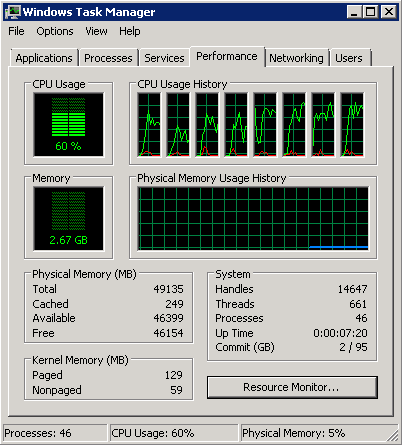
1. Install xperf. Now xperf is in windows SDK. The setup file is wpt_x64.exe for amd64.
2. Start tracing
xperf -on latency -stackwalk Profile
3. After a while, stop tracing and generate trace file trace.etl.
xperf -d trace.etl
4. analyze the result. You need to provide pdb file to show the function name.
xperf trace.etl
As you can see sal_usleep() is the culprit and takes most of CPU time.

After we fix sal_usleep(), the CPU utilization drops significantly.

Another powerful feature of xperf is stack walking. It will output call stacks of a function. More information can be find here (stack walking) and here (enable stack walking on x64).
Subscribe to:
Posts (Atom)